
Check out our White Paper Series!
A complete library of helpful advice and survival guides for every aspect of system monitoring and control.
1-800-693-0351
Have a specific question? Ask our team of expert engineers and get a specific answer!
Sign up for the next DPS Factory Training!

Whether you're new to our equipment or you've used it for years, DPS factory training is the best way to get more from your monitoring.
Reserve Your Seat Today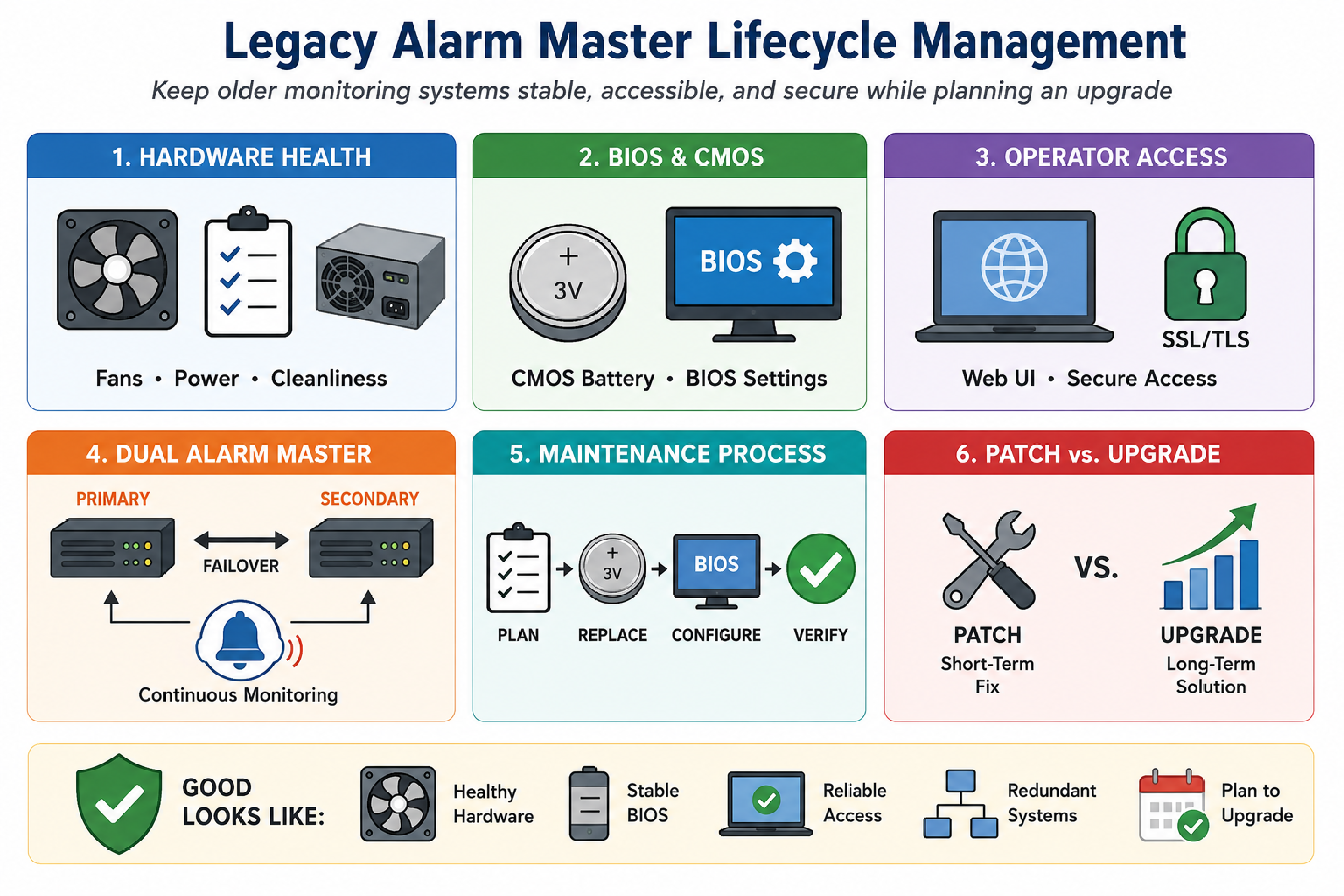
Legacy alarm master lifecycle management refers to the set of practices used to keep an older monitoring server stable, accessible, and secure while an organization plans an eventual upgrade. This typically includes hardware health remediation (fans, power, storage), firmware configuration control (BIOS and CMOS battery), and safe operator access (web UI compatibility with modern browsers and TLS).
This article describes common failure patterns seen in older, rack-mounted alarm master systems used in telecom and critical infrastructure NOCs, including persistent low fan RPM alarms, BIOS settings that may not persist due to an aging CMOS battery, and web access failures caused by outdated SSL/TLS stacks. The guidance applies broadly to environments running an older Fedora-based OS and a dual-system setup (primary and secondary alarm master) with limited recent maintenance.
A low CPU fan RPM alarm means the system detects that a CPU cooling fan is rotating below a configured threshold, even if CPU temperature remains within safe limits. Many systems alert on fan speed because a fan that is slowing down can fail completely, causing rapid overheating later.
In older platforms, low RPM alarms can become frequent and noisy, especially after periods of low activity such as weekends. This can happen because the fan controller and BIOS thresholds were designed for older fan characteristics, and aging fans often drift lower in RPM even when they still move enough air.
RPM-based alarming is a proxy for cooling reliability, not a direct measurement of CPU temperature. A system can show safe temperatures at the moment an RPM alarm occurs, but still be at risk if airflow declines further or ambient temperature increases. RPM alarms are also sensitive to BIOS thresholds, fan tachometer accuracy, and dust buildup that adds mechanical drag.
Fan RPM alarm troubleshooting is the process of determining whether the issue is environmental (dust and airflow), configuration (BIOS sensitivity thresholds), or hardware degradation (fan bearing wear). The objective is to reduce nuisance alarms while preserving protection against a real cooling failure.
Confirm the alarm type and scope. Identify whether the alarms are tied to CPU fan(s), chassis fan(s), or a specific sensor channel. Confirm if both primary and secondary systems show similar behavior or only one.
Check whether temperature alarms exist. If there are no over-temperature alarms, treat the event as a warning that still requires action, but avoid emergency responses that increase risk.
Inspect for dust and airflow restrictions. Dust accumulation can reduce RPM and airflow. If approved by site safety practices, clean intake and exhaust paths. Compressed air cleaning can help, but it should be performed carefully to avoid spinning fans excessively and to avoid blowing debris into sensitive components.
Validate physical fan operation. Listen for bearing noise, wobble, or intermittent stalls. These are indicators of aging hardware.
Review BIOS fan threshold settings. Many older BIOS implementations allow selecting fan sensitivity or minimum RPM thresholds. A threshold that was reasonable when the fan was new can become too aggressive as the fan ages.
Plan for replacement if the alarm persists. If cleaning and threshold adjustment do not stabilize alarms, replace the fan. Mechanical wear is not recoverable by configuration changes.
BIOS adjustments are appropriate when the fan is stable and the system is cooling adequately, but the threshold is set too high for the current hardware behavior. BIOS adjustments are not appropriate when the fan is intermittently stopping, making grinding noises, or when temperatures are elevated under load. In those cases, replacement is the correct risk-reducing action.
A CMOS battery (commonly a coin-cell battery on the motherboard) provides power to preserve BIOS/CMOS settings when the system is powered off. In older monitoring servers, the original battery may be far beyond its expected service life. When the battery fails, BIOS settings can reset to defaults on power loss or reboot.
In alarm master systems, BIOS defaults can be operationally dangerous because storage, boot order, and controller settings may change. If RAID or boot configuration settings are lost, the system might fail to boot or may boot into an unexpected mode after a restart.
BIOS changes made to reduce fan sensitivity, enable legacy options, or adjust boot order may not persist across reboots if the CMOS battery can no longer hold settings. This creates a scenario where the system appears fixed during a maintenance window, then reverts after a later power event.
Replacing the CMOS battery can trigger an immediate reset of BIOS configuration to defaults. This is why battery replacement should be treated like a controlled change with a rollback plan, not like a simple consumable swap.
Coordinating CMOS battery replacement and BIOS reconfiguration means planning a single, controlled session where physical access, console access, and a knowledgeable operator are available to restore required BIOS settings after replacement. This reduces the risk of unexpected boot failures and minimizes the number of times the system needs to be opened and restarted.
Record current state. Capture the current firmware settings and any storage controller configuration that could affect boot behavior.
Schedule a supervised session. Coordinate with the monitoring vendor support team to be on session during battery replacement and first boot.
Replace the battery. Perform the replacement with the system in a known safe state, following site procedures.
Boot directly to BIOS. Confirm that critical settings are restored, including any fan threshold changes and boot device order.
Confirm application health. Validate alarm ingestion, alarm display, and any downstream notifications after the system returns to service.
For organizations using DPS Telecom alarm master systems such as T/Mon, this is also the right time to validate that primary and secondary units are in a known good failover posture so that one system can cover monitoring while the other is being serviced.
Modern browsers reject web access to older monitoring systems when the server only supports outdated SSL/TLS versions or weak cryptographic parameters that current browser security policies block. From the operator perspective, this appears as a browser warning or an inability to load the web UI at all, even when the system is reachable over the network.
Older Fedora-based platforms and legacy web applications often rely on cryptographic libraries that predate modern TLS requirements. A monitoring server may be configured to force HTTPS, but the resulting HTTPS session fails with current browsers.
When a NOC cannot access the alarm master web UI, basic operational tasks such as acknowledging alarms, reviewing history, and checking device status can shift to less efficient methods. Some teams fall back to legacy applets or alternative consoles, which can increase training burden and slow incident response.
Enabling HTTP access is an interim workaround where the monitoring system provides unencrypted web access to restore usability when HTTPS cannot be negotiated with modern browsers. HTTP can be acceptable for specific internal-only scenarios, but it should be treated as a risk-managed exception with compensating controls.
In some legacy environments, DPS Telecom has provided patches or configuration options that allow HTTP access as an operational bridge. This does not modernize cryptography, but it can restore day-to-day access while an upgrade is planned and budgeted.
The patch-versus-upgrade decision is the process of balancing operational continuity against growing security and reliability risk. Patches that enable access (such as HTTP) can be appropriate short-term, but they do not remove the underlying end-of-life constraints of old operating systems, libraries, and hardware.
| Decision Factor | Interim Patch / Workaround | Planned Upgrade |
|---|---|---|
| Primary goal | Restore usability quickly | Restore security posture and long-term supportability |
| Security impact | May reduce security (example: HTTP) | Enables modern TLS and supported OS components |
| Hardware risk | Does not address aging fans, batteries, disks | Refreshes or validates underlying platform health |
| Operational disruption | Low, if controlled | Moderate, requires planning and change control |
| Supportability | Limited by legacy stack constraints | Improved through current software and maintenance |
A practical approach for many organizations is a two-phase plan: implement a controlled workaround to keep operators productive, then complete a formal upgrade when the maintenance and capital budget cycle allows.
A dual alarm master setup refers to having two alarm master units operating as primary and secondary systems to reduce the risk of monitoring blind spots during maintenance or failure. The secondary system can provide continuity when the primary system is being rebooted for BIOS work, hardware service, or software changes.
Dual-system architectures only reduce risk when failover behavior is validated. This includes validating alarm ingestion on both systems, verifying time synchronization, and confirming that downstream notifications and operator workflows are consistent.
A hybrid monitoring environment means multiple monitoring platforms share responsibility for visibility, such as an alarm master for facility and network alarms plus another monitoring tool for performance or device polling. Hybrid environments are common in telecom and industrial networks, but they can create tool sprawl and inconsistent alarm handling.
When operators rely on multiple systems, the main failure mode is not a lack of alarms, but a lack of clarity. Alarms can arrive in different formats, acknowledgments do not synchronize, and escalation rules may diverge. Integration is the mechanism that turns multiple sources into a single operational picture.
T/Mon alarm master role. T/Mon is commonly used as a central point for alarm collection, filtering, and operator workflows in a NOC.
Protocol mediation and alarm integration. DPS Telecom projects often include integrating SNMP traps, discrete alarms, and serial protocols into a consistent alarm model, reducing the need for operators to pivot between multiple screens.
Remote telemetry and contact closure collection. NetGuardian RTUs from DPS Telecom are commonly recommended for remote sites that need discrete inputs, environmental sensors, and SNMP trap forwarding into an alarm master.
In legacy environments where training has been minimal, a short operator enablement session can also reduce risk by standardizing how alarms are acknowledged, cleared, and escalated across systems.
Good legacy monitoring posture means the alarm master is predictable, maintainable, and accessible without undermining security controls. This does not require perfection, but it does require documented decisions and a forward plan.
Fan RPM alarms after weekends often indicate that a fan is slowing as bearings age or that dust is increasing drag. Thresholds in the BIOS may also be set too aggressively for the current fan behavior.
It is not safe to ignore them long term. The absence of a temperature alarm does not mean the cooling system is healthy. RPM alarms are an early warning that a fan may fail later under higher load or higher ambient temperature.
The main risk is that BIOS settings can reset to defaults immediately, which can affect boot order and storage controller configuration. This can lead to a system that does not boot or behaves unexpectedly after restart.
Modern browsers block older SSL/TLS versions and weak cryptography. If the monitoring system forces HTTPS but only supports legacy protocols, the browser will refuse the connection.
HTTP can be a reasonable interim workaround when the system is behind a firewall on a restricted management network and compensating controls are in place. It should be documented as temporary and paired with an upgrade plan.
DPS Telecom can help by centralizing alarms in an alarm master workflow (such as T/Mon), integrating SNMP traps and other protocols, and recommending NetGuardian RTUs for remote telemetry and discrete alarm collection.
If a legacy alarm master is generating persistent hardware alarms, showing signs of CMOS/BIOS fragility, or becoming inaccessible due to outdated TLS, the fastest path to stability is a controlled remediation plan paired with a realistic upgrade roadmap. DPS Telecom can help you prioritize fan and battery risk, restore safe operator access, and design an upgrade approach that fits your NOC workflow and budget cycle.

Andrew Erickson
Andrew Erickson is an Application Engineer at DPS Telecom, a manufacturer of semi-custom remote alarm monitoring systems based in Fresno, California. Andrew brings more than 19 years of experience building site monitoring solutions, developing intuitive user interfaces and documentation, and opt...


