Check out our White Paper Series!
A complete library of helpful advice and survival guides for every aspect of system monitoring and control.
1-800-693-0351
Have a specific question? Ask our team of expert engineers and get a specific answer!
Sign up for the next DPS Factory Training!
Whether you're new to our equipment or you've used it for years, DPS factory training is the best way to get more from your monitoring.
Reserve Your Seat Today
By Andrew Erickson, Application Engineer at DPS Telecom
The best remote terminal unit (RTU) for your remote sites has enough inputs for everything you want to monitor there, with room to grow. It also speaks the protocol of your master station or Simple Network Management Protocol (SNMP) manager, runs on the site's power, is rated for the site's temperatures and connects over the network link the site already has. Once you've written those requirements down, the model that meets all of them is the best one for you.
At DPS Telecom, we've been based in Fresno, California since 1986, and we design, manufacture and test our NetGuardian RTUs in-house there. When clients ask which RTU fits their sites, our application engineers work through those same requirements with them.
The first step in choosing an RTU is writing down everything you want to monitor at the site, before you look at any models.
Say you're writing the list for one of your sites. The generator goes on it, because it ran out of fuel once and overheated another time. Its low oil pressure alarm goes on too. You've never seen that alarm trip, but the generator has an output for it, and it could happen. The site itself overheated once, so you want the room temperature. You'd like to track how much power the site and its air conditioner use, for an energy-saving initiative you're running. And you want to know when the door opens or the motion sensor goes off.
If there's anything at the site you'd like to switch on or off from your desk, such as a piece of equipment you sometimes need to restart, put that on the list too. An RTU handles those through its control relay outputs.
Most of what goes on a list comes from problems you've already had at your sites and from standard practice in your industry. You don't need to have had a break-in at a remote site to know that a door sensor or a motion sensor is worth having. Across the sites our clients monitor, the most common sensors are for temperature, water and humidity, along with door contacts and motion sensors for security.
Site equipment reports alarms by contact closure, analog signal, a digital protocol like Modbus, or a message sent over the network. The RTU has to read whichever form each item on your list uses, so check the manual or spec sheet for each piece of equipment.
Note the form next to each item on your list. It tells you what kind of input each item takes, and whether the item needs the RTU at all.
Equipment that can already send its alarms over the network doesn't need to go through the RTU. An SNMP trap can go straight to your SNMP manager or master station, and some master stations can take email alarms as well. The RTU serves as the gateway for equipment that can't talk on the network by itself, like a generator that only closes a relay or a temperature sensor that only puts out a signal. Those are the items you count when you size the RTU.
Your RTU needs an input for each item you want to monitor and an output for each item you want to control, plus 10 to 20 percent spare for growth. RTU spec sheets list each type of input and output (I/O) on its own line, so sort your list by the type each item needs.
| Type of I/O | What it handles | Examples from a site list |
|---|---|---|
| Discrete input | One contact closure, which is either in alarm or not | Generator low fuel, door contact, motion sensor |
| Analog input | A voltage or current that changes with what it measures | Room temperature, battery voltage, power use |
| Control relay output | A switch you operate remotely | Restarting a piece of site equipment |
| Recommended Standard 485 (RS-485) serial port | A Modbus connection to smart equipment | Generator controller |
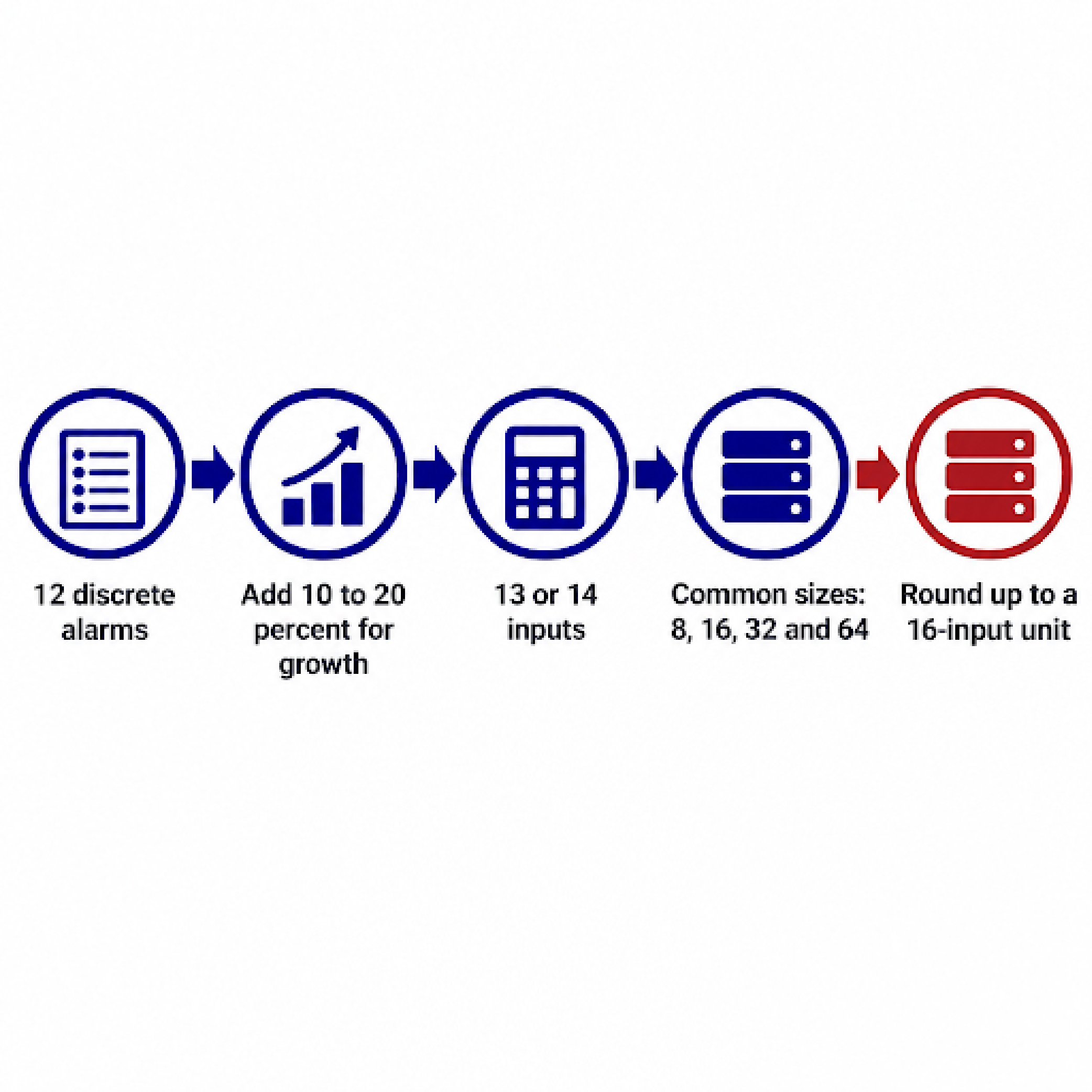
Then count each type and add the spare. Say your list comes to 12 discrete alarms. Adding 10 to 20 percent for growth brings that to 13 or 14.
RTUs aren't usually sold with 13 or 14 inputs. Common sizes are 8, 16, 32 and 64 discrete inputs, so round your count up to the next one. For 13 or 14 discrete inputs, that's a 16-input unit.
Count analog inputs, control relays and RS-485 ports the same way.
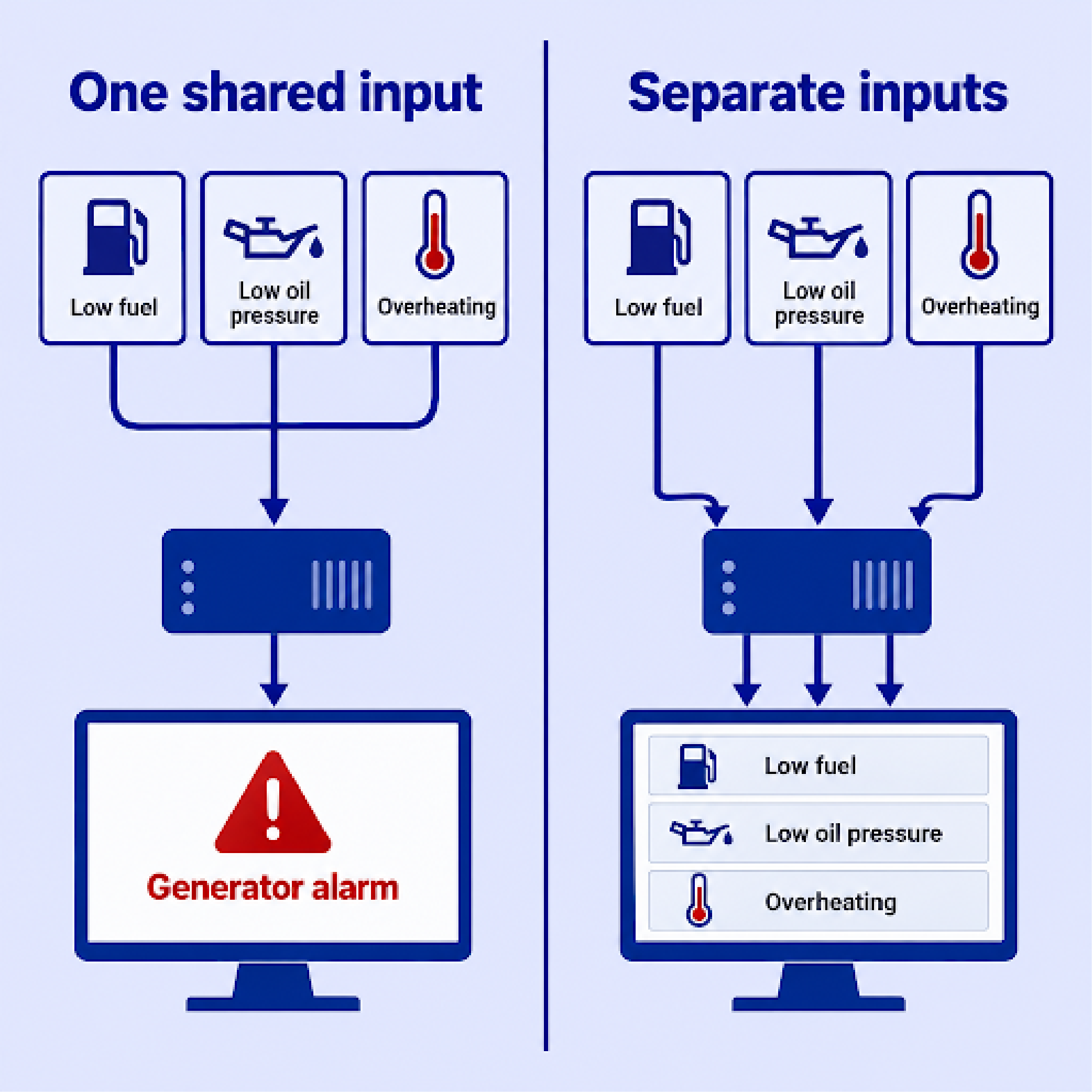
With an 8-input unit, you'd have to leave some items unmonitored or wire several alarms into a single input. If the generator's low fuel, low oil pressure and overheating alarms share one input, your master station shows a generator alarm and nothing more. Nobody can tell from a desk which of the three tripped, and someone may have to drive to the site to find out.
Spare inputs cover the alarm you didn't think of and the equipment you add to the site later. Blair Stringam and Paul Elser, writing about choosing RTUs for irrigation canal automation, called it "good practice to use a device that has one or two extra analog inputs and extra I/O." Buying far more inputs than you'll ever use wastes money, though, because RTU prices rise with capacity.
Most of our NetGuardian line comes in those common sizes. The NetGuardian DIN has 8 discrete inputs, the NetGuardian 216 and 216F have 16, the NetGuardian G6 832A has 32, and the NetGuardian 864A has 64. The NetGuardian 420 fills the gap between 16 and 32 with 20 inputs, and the NetGuardian 480 G4 has 80.
The G6 832A also has 8 analog inputs, 8 control relays and an RS-485 port. Polling Modbus data from site equipment over that port is an option you choose when you order. The 480 G4 can read Modbus data over the local network. For any other model, ask us before you count on it for Modbus.
An RTU works with your master station or SNMP manager only if it reports in a protocol that system can read. That system was often chosen by the people before you, or by you a few years ago, and the RTU has to fit around it. If you're buying a new master along with the RTU, you can choose the two together.
If you run an SNMP manager, choose an RTU that supports SNMP. SNMP is a sensible choice even without one, because so many monitoring systems can read it.
If your master station uses a proprietary protocol, or any number of other older protocols, and you're not in a position to replace it yet, the RTU needs to speak that protocol instead. Our NetGuardian RTUs report to standard SNMP managers, and to our T/Mon master stations in our own DPS Communication Protocol (DCP). Tell us what your master station speaks, and we'll tell you whether a NetGuardian can report to it.
Also check the RTU against your requirements for security and alerts:
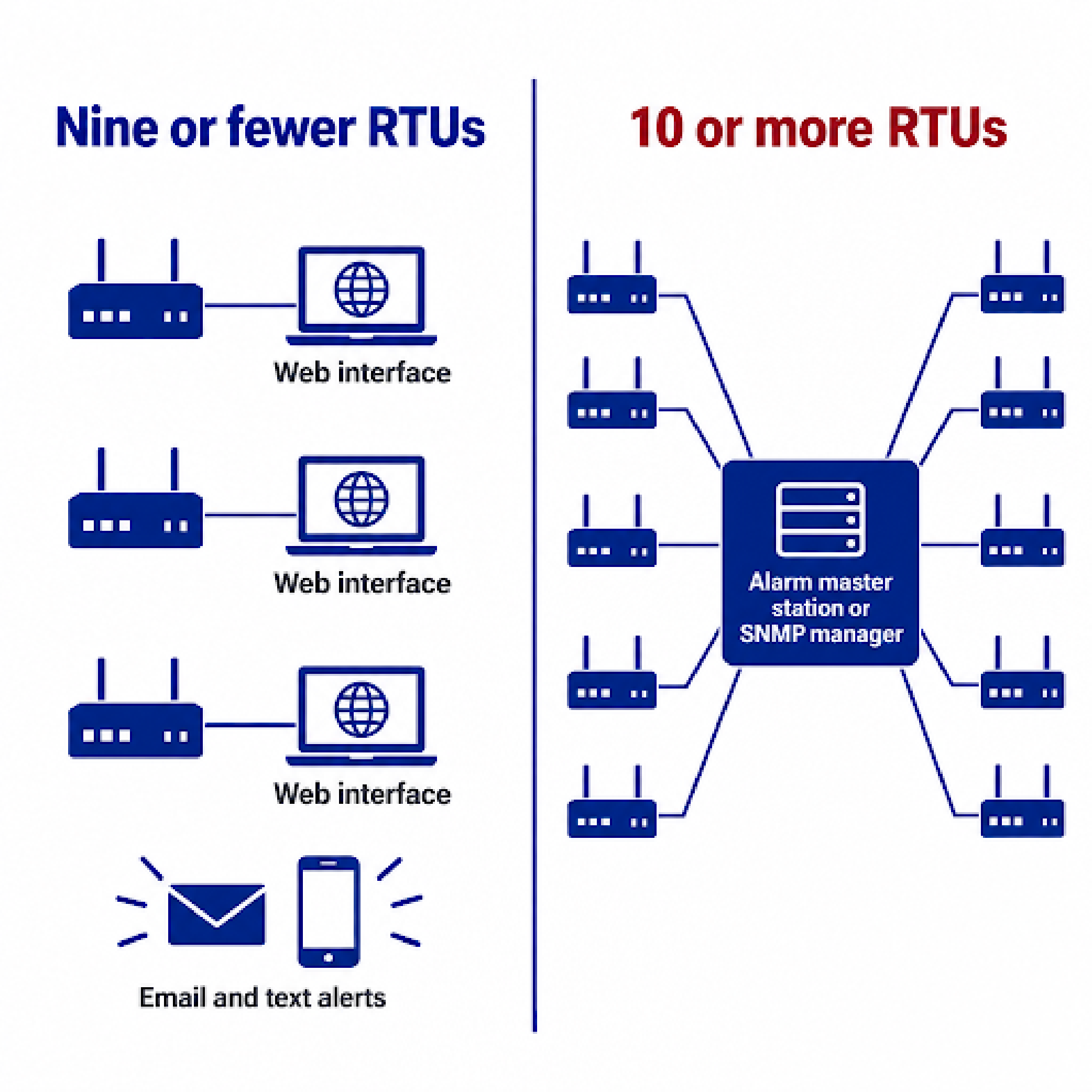
With nine or fewer RTUs, you can usually get by without a master station. Each RTU's web interface shows its own alarms, and its email and text alerts tell your team when something trips. At 10 or more RTUs, logging in to each one separately stops being practical, and most networks that size use an alarm master station or SNMP manager to collect everything in one place.
Once you know the RTU can report to your master station, check that it runs on the power your site already has. Most telecom sites run on direct current (DC) at -48 volts (-48 VDC), but many remote sites use something else. An RTU built for one DC voltage needs a converter at a site with another, which adds cost and one more device at the site that can fail.
The type of site usually tells you what power it has.
| Type of site | Usual power supply |
|---|---|
| Telecom huts, shelters and cabinets | -48 VDC |
| Solar-powered sites | +12 VDC |
| Power utility substations | +125 to +130 VDC |
| Data centers and server rooms | Alternating current (AC) |
Many remote sites also run on +24 VDC, so check the site's power plant before you order.
Substations also have their own standards for electrical surges and interference, covered in our guide to choosing an RTU for utility substation monitoring. If you need a NetGuardian for a substation's DC supply, ask us which power options fit.
Most of our NetGuardian RTUs run on -48 VDC as standard and offer other voltages as options. The NetGuardian G6 832A and NetGuardian DIN, for example, can be built for ±12, ±24 or ±48 VDC.
For a site with only AC outlets, several NetGuardian models are available with a wall adapter that plugs into the outlet and supplies DC to the RTU. Some RTUs from other manufacturers run on AC directly.
We keep DC as our default because, long term, an RTU belongs on a site's protected DC power, where it keeps reporting through a utility outage. Clients who want AC are usually buying only one or two units, or setting up a lab or test environment for a limited time. A wall adapter is fine for a small number of units or a temporary lab. Because the RTU itself runs on DC, it can move to a remote site later. The adapter comes off, and the RTU connects to the site's DC supply, as long as the site's voltage matches the unit's DC input.
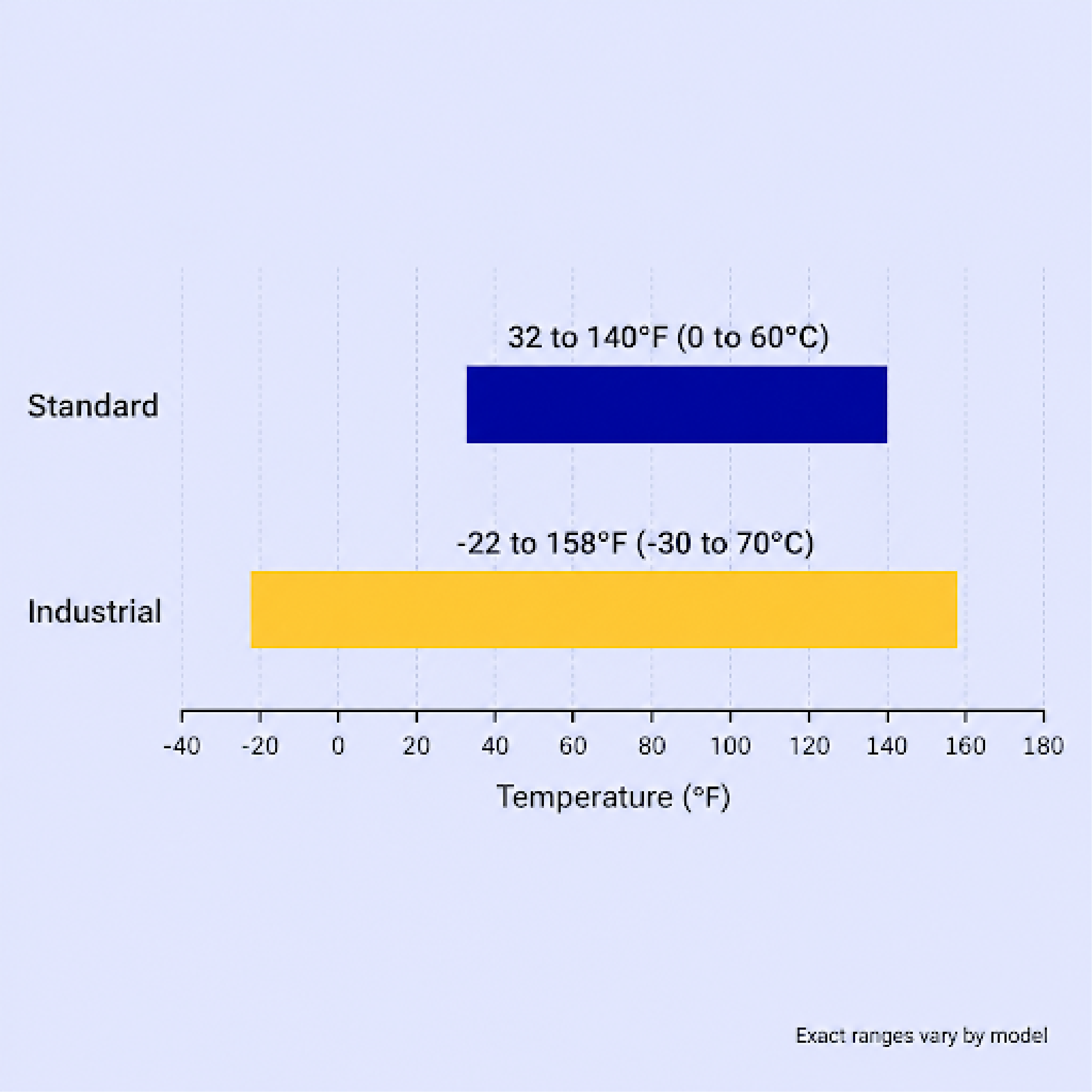
Your RTU needs an industrial temperature rating if your site can leave the standard range, which on our NetGuardian RTUs is 32 to 140°F (0 to 60°C). Our industrial temperature builds extend that to -22 to 158°F (-30 to 70°C). To make an industrial build, we replace a few of the parts most vulnerable to heat and cold with more durable ones. Exact ranges vary by model, so check the spec sheet of any unit you shortlist.
Many of our clients find the industrial temperature rating to be an easy option to add. It's worth the cost at sites with wide temperature swings, like outdoor cabinets and unheated shelters. It's also worth considering at a climate-controlled site if you want headroom. If the site's air conditioner fails, the room heats up, and the RTU has to keep working long enough to report it.
Other clients see the industrial build as unnecessary, because they know their site will never leave a range of about 60 to 90°F.
The last check is how the RTU connects back to your network, and the best answer is usually the link that already reaches the site. At most sites, that's Ethernet.
Many of our clients have moved off T1, but NetGuardian RTUs still connect over T1 at sites that use it. If any of your sites still report over T1 or another copper circuit, ask your carrier how long it will keep that circuit running. In March 2026, the Federal Communications Commission (FCC) adopted rules that make it easier for carriers to retire their copper line networks.
Where fiber reaches the site, the RTU can connect to it directly. Our NetGuardian 216F and NetGuardian G6 832A each have two small form-factor pluggable (SFP) fiber ports. The G6 832A accepts SFPs rated from 0.55 to 180 kilometers.
Sites without a wired connection can report over cellular or satellite. Most of our NetGuardian RTUs reach those links through an external cellular or satellite gateway. The NetGuardian 216 SMS can also be built with a cellular modem on its back panel.
An RTU model belongs on your shortlist when it:
That RTU collects everything you care about at the site and controls what you need it to, so your team only travels to the site when there's work to do there.
Several models may meet every point. To choose between them, compare their security features, manufacturer support and lifetime cost.
When your list is ready, send it to us with each site's power, its network connection and the master station or SNMP manager you use. Our engineers will go through it with you and tell you which NetGuardian fits your sites.
Talk to an Engineer | 800-693-0351

Andrew Erickson
Andrew Erickson is an Application Engineer at DPS Telecom, a manufacturer of semi-custom remote alarm monitoring systems based in Fresno, California. Andrew brings more than 19 years of experience building site monitoring solutions, developing intuitive user interfaces and documentation, and opt...